
Summary
Direct Mail & CRM Integration Boosts DTC Marketing
Direct mail used to mean buying a list, printing a thousand postcards, and hoping for the best. Tools with CRM integration changed that. Now you can trigger a postcard, catalog, or product sample the same way you trigger an email based on what a customer actually does.
For DTC brands on Klaviyo, this is a big deal. You can send a physical piece of mail when a cart is abandoned, a VIP threshold is hit, or a customer goes quiet. It creates a touchpoint that typically drives 2–3x higher conversion rates than digital alone.
Why bother? Because email-only strategies are hitting a wall. Inboxes are brutal. Top ecommerce email platforms are seeing it, and growth managers are realizing they need more than one channel to scale. Direct mail cuts through the noise. Your CRM integration just makes sure the timing, personalization, and attribution line up with your email marketing automation logic.
What Direct Mail Advertising Tools Actually Do
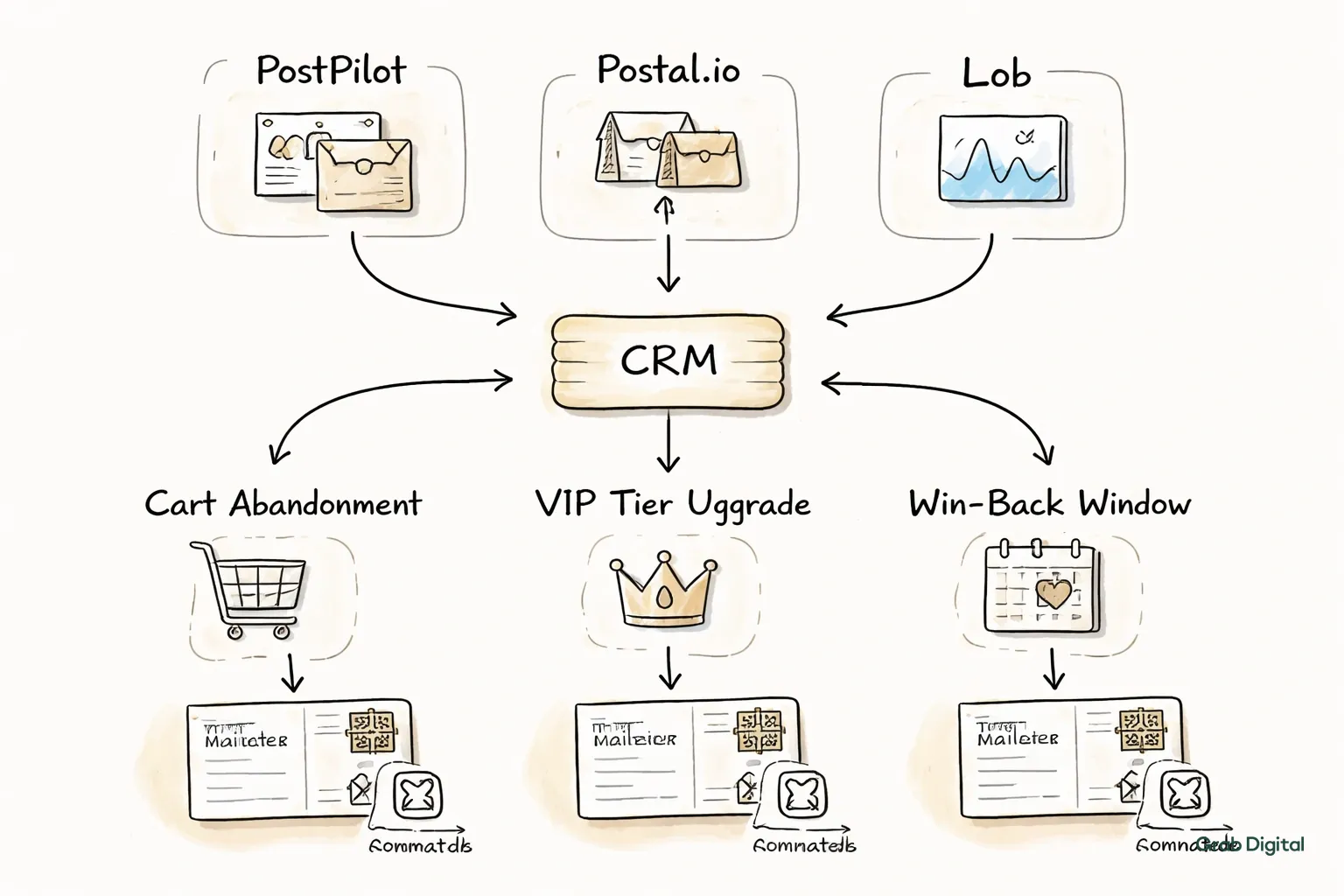
These tools take the friction out of physical mail. They handle the printing, the addressing, and the delivery. But the real value is the API connection to your CRM.
When a subscriber abandons a cart, hits a VIP tier, or drifts into a win-back window, the tool fires off a mailer automatically. You don't export lists. You don't brief a printer. The platform verifies addresses against USPS databases, prints variable data (names, specific products, unique codes), optimizes postage, and adds QR codes or tracking pixels for attribution.
You set the logic in your CRM. The tool handles the rest. The best ones especially for Klaviyo users surface the performance data right next to your email metrics, so you aren't jumping between dashboards to see what's working.
CRM Integration Requirements for DTC Brands
Integration is the difference between junk mail and a relevant touchpoint. It means your direct mail tool reads real-time data custom properties, events, segments from your CRM.
If a customer enters a "high-intent lapsed" segment in Klaviyo, the direct mail tool should see it and trigger a postcard within hours. Not next week.
You need a few specific features to make this work:
- Event-based triggers: Fires mail when someone abandons a cart, buys something, or stops opening emails.
- Dynamic content: Populates the mailer with names, past purchases, or specific product recommendations.
- Suppression logic: Automatically excludes anyone who just bought, unsubscribed, or got a piece of mail in the last 30 days.
- Attribution: Sends conversion data back to the CRM using unique codes or links tied to that specific person.
- Cost controls: Lets you set budget caps so a winning segment doesn't accidentally bankrupt you.
Without this, you're just batch-and-blasting. With it, physical mail becomes just another arm of your DTC email marketing flows.
Top Direct Mail Tools with Native Klaviyo Integration
PostPilot is the front-runner for Shopify + Klaviyo users. It syncs segments in real time. You build postcards using the same triggers as your email flows. Attribution is clean it ties unique discount codes to Klaviyo profiles, and the revenue shows up in your dashboard next to your email stats.
Postal.io is better for high-value gifting. It connects via Zapier or API and sends physical gifts when customers hit milestones. Think welcome boxes for big first purchases or anniversary gifts for long-term subscribers.
Lob is what you use if you have developers. It’s an API-first platform. You connect via webhooks. It’s great for brands that want total control over the design and logic but have the engineering resources to build it out.
PFL (formerly Printfection) is solid for dimensional mail and swag. It connects through Zapier and handles the logistics of shipping boxes or kits. Good for brands that want to send product samples or multi-touch welcome kits that pair with email flows.
Sendoso skews B2B but works for high-ticket DTC. If your AOV is high enough to justify $50+ mailers, the manual Klaviyo integration is stable enough for VIP lists.
For most brands, if you’re under $100 AOV, start with postcards via Lob or PostPilot. If you’re over $100 AOV, look at full gifting platforms like Postal.io.
How to Structure Direct Mail Campaigns in Your CRM
Don’t reinvent the wheel. Map your direct mail to the flows you already have.
If you have an abandoned cart flow, add a postcard. If the third email goes out at 72 hours, schedule the postcard to land on day five. It reinforces the message and catches the people who didn't even see the email.
Here’s a decent hierarchy to start with:
- Welcome series: A postcard 5–7 days after a first purchase. "Thanks for the order, here’s what’s next."
- Win-back: For people who haven't opened an email in 60 days but spent over $150 last year.
- VIP retention: Quarterly postcards to your top 10% of customers with early access or exclusive offers.
- Browse abandonment: If they looked at a product three times and didn't buy, send a postcard with that exact item on it.
- Subscription renewal: A physical reminder 10 days before the card on file gets charged.
Build segments for each. Define the entry rules, the exclusions, and the exit triggers exactly like you would for email segmentation. Test one at a time.
Use unique discount codes or QR codes on every piece. When they convert, pass that data back to the CRM. Compare the cost-per-acquisition to your email marketing ROI.
Personalization Strategies Using CRM Data
The difference between a converting postcard and recycling-bin fodder is relevance. Your CRM has the data. Use it.
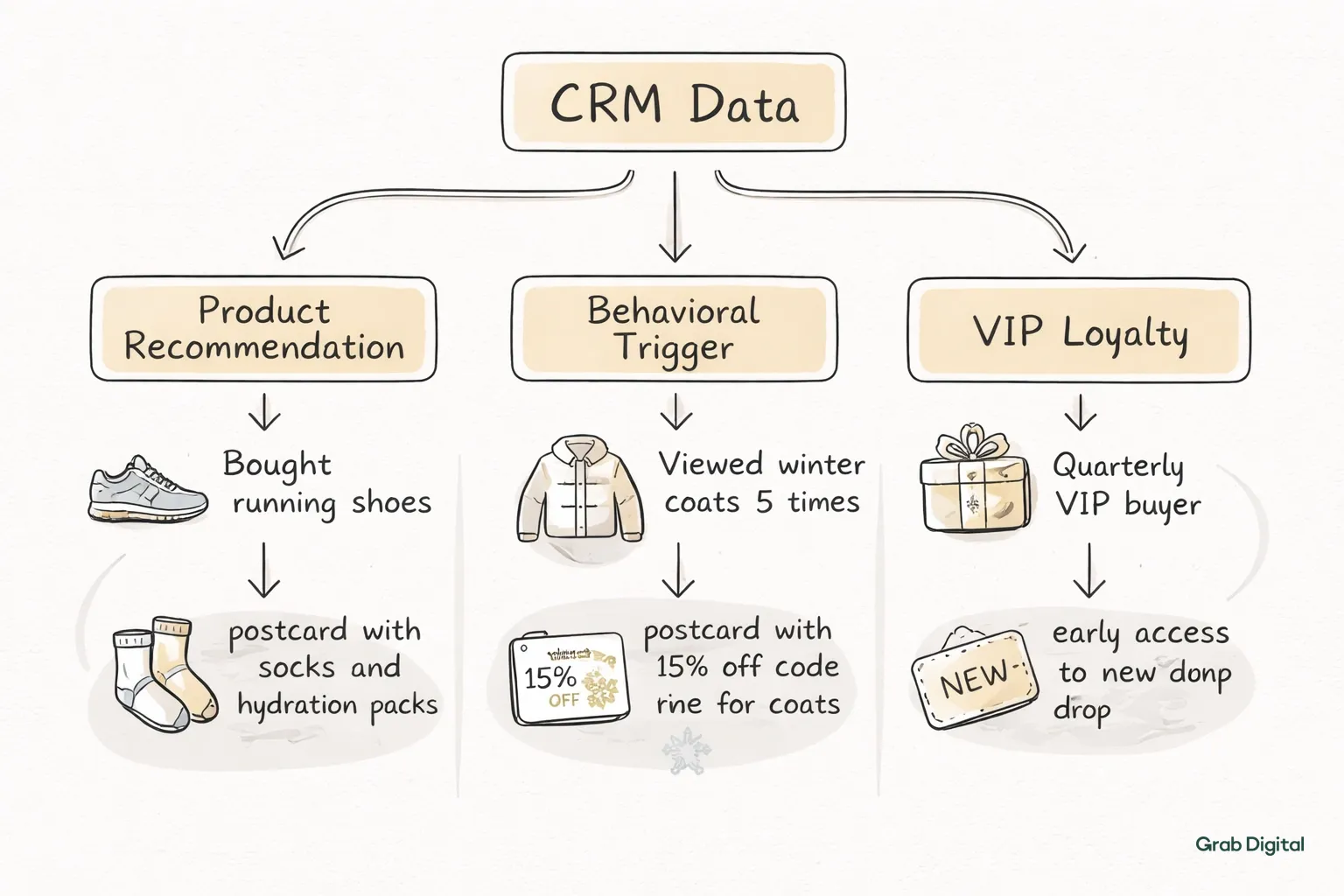
Product recommendations should match your email logic. Bought running shoes? Send a postcard featuring socks or hydration packs. Pull that product data from custom properties and dump it into the variable data fields.
Behavioral triggers set the timing. Viewed winter coats five times? Send a postcard with a 15% code for those specific coats. A VIP buying quarterly? Give them early access to the new drop. It’s the same logic as your DTC email strategy, just on paper.
Lifecycle stage changes the offer. First-timers get the brand story. Lapsed customers get a steep "come back" discount. High-value repeat buyers get something exclusive, not a generic sale announcement.
Geography matters, too. If you have zip codes, don't send swimsuit promos to Minnesota in March. Target regionally. It requires good data hygiene, but the conversion lift is worth it.
Test one thing at a time. Offer depth, product selection, design. Pick a winner, scale it, then test the next variable, just like email campaign management.
If you want to get this running without messing up your existing flows, book your consultation to map out the logic.
Cost Analysis and Budget Planning
Direct mail is expensive. 10 to 20 times the cost of email. A postcard is $0.75 to $2.00 all-in. Letters are $1.50 to $3.00. Boxes start at $10.
Do the math before you start. If your AOV is $150 and margin is 40%, you make $60 profit per order. A $2 postcard breaks even at roughly a 3.3% conversion rate. Targeted DTC campaigns usually see 2–8%, so there is room for profit, but only if you target well.
Follow the 80/20 rule. Put 80% of your budget into segments you know will convert. Use the other 20% to test new ideas.
A starter budget might look like this:
| Segment | Audience Size | Mail Volume | Cost/Piece | Spend | Target CVR | Target Rev |
|---|---|---|---|---|---|---|
| Cart abandonment (high value) | 800 | 400 | $1.50 | $600 | 5% | $3,000 |
| Win-back (90+ days) | 2,000 | 500 | $1.25 | $625 | 3% | $2,250 |
| VIP quarterly | 300 | 300 | $2.50 | $750 | 10% | $4,500 |
| Total | 1,200 | $1,975 | $9,750 |
This is testing money. If it works, you scale. If it fails, you kill it.
Save money where you can. Reuse templates and just swap the variable fields. Ask for volume discounts once you hit 2,000 pieces a month. Use standard delivery instead of first-class when speed isn't critical.
Attribution and Performance Tracking
Tracking direct mail is harder than email. You can't drop a pixel on a postcard. But you can get close enough to make decisions.
The simplest method is unique discount codes. Print a specific code on each postcard. When it’s used, your CRM attributes the sale to that campaign. The downside? If they forget the code, you miss the attribution.
QR codes are getting better. Print a unique code on the mailer that links to a landing page with UTM parameters. The session gets captured, matched to a profile, and the conversion is attributed. Most people under 55 know how to use them now.
PURLs (personalized URLs) are the most accurate but a hassle to set up. Each recipient gets a link like grabdigital.co/jane-smith. It redirects, tracks the visit, and ties it to the customer record. Use this for high-value campaigns where precision matters.
Holdout groups are the ultimate sanity check. Exclude 10% of your segment from the mailing. Compare their purchase rate to the group that got the mail. The difference is your true lift.
Watch these metrics alongside your DTC email marketing dashboard:
- Delivery rate: Aim for 95%+.
- Conversion rate: 3–8% for good segments.
- Revenue per piece: Should be 5–10x your cost.
- Payback period: Under 30 days is ideal.
Integration Workflows for Klaviyo Users
In Klaviyo, you build direct mail as a parallel flow. The triggers are the same.
Basic setup: Connect the tool. PostPilot is one click. Lob needs an API key. Once connected, you’ll see a "send postcard" action inside your flow builder.
Cart abandonment: Trigger off the event. Wait 72 hours. Check the cart value (over $75). Send the postcard. It lands five days after the abandonment, backing up your email series.
Win-back: Target people who haven't opened an email in 60 days but bought in the last year. Send a postcard with a 20% "we miss you" code. This catches people who mentally unsubscribed but didn't click the button.
VIP: If LTV > $500, add them to a quarterly flow. Send early access or a thank you note.
Browse abandonment: If they viewed a product three times, no purchase, wait seven days, send a postcard. It extends your browse abandonment flow into the physical world.
Add filters. Don’t mail anyone who bought in the last 30 days or got mail in the last 45. Protect the experience.
For the technical details, this guide on direct mail automation for DTC brands with Klaviyo is useful.
Testing Strategy for Multi-Channel Campaigns
Direct mail tests are slower and pricier than email tests. You need 200–300 pieces per variant to get significance. And you have to wait 14–21 days for the full picture.
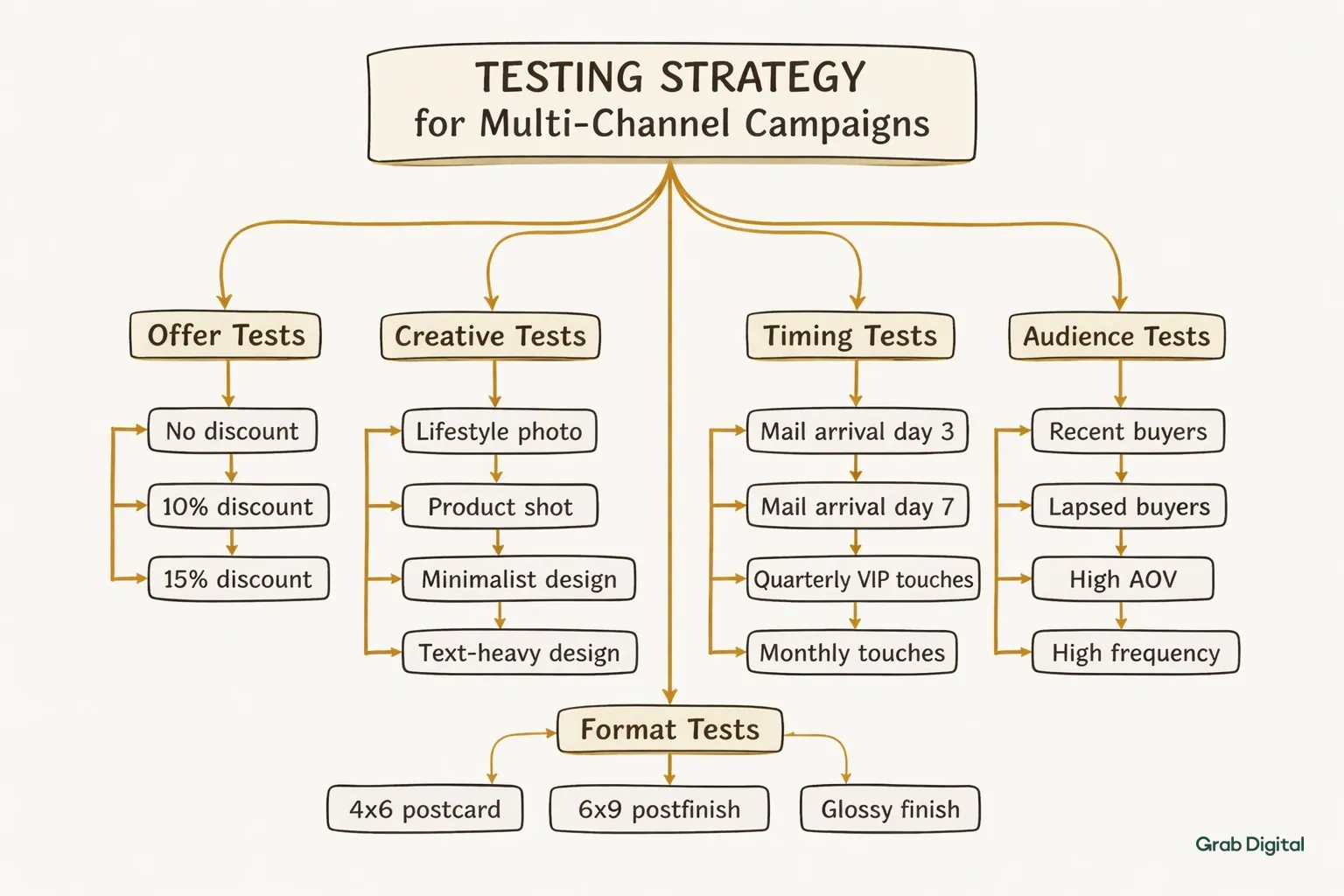
Offer tests: Try no discount vs. 10% vs. 15%. See what maximizes profit, not just conversion.
Creative tests: Lifestyle photo vs. product shot. Minimalist vs. text-heavy.
Timing tests: Mail arriving day 3 vs. day 7 post-abandon. Quarterly VIP touches vs. monthly.
Audience tests: Recent buyers vs. lapsed. High AOV vs. high frequency.
Format tests: 4x6 vs. 6x9 postcard. Glossy vs. matte.
Document everything. Tag your campaigns. Keep a log of what you learned. Build a roadmap so you aren't testing randomly.
Privacy Compliance and Data Security
You’re mailing to physical addresses. That’s personal data. GDPR, CCPA, and CAN-SPAM apply.
If someone unsubscribes from marketing, they need to be suppressed from direct mail, too. Your integration should handle this automatically.
Check your consent language. If you said "email updates only," you might not have permission to mail them. Update your privacy policy and signup forms to cover it.
Don't send more data than necessary. Your mail tool needs a name and address. It doesn't need payment info or full browsing history.
Make sure suppression lists sync daily. If someone requests deletion under GDPR, that record needs to vanish from your mail platform immediately.
When Direct Mail Outperforms Email Alone
Email isn't dead, but it is crowded. Direct mail works when email stops working.
High-value customers: If the order is over $200, a physical touch feels premium.
Email non-responders: They stopped opening. They didn't unsubscribe. A postcard wakes them up.
Deliverability issues: If your domain reputation is tanking, mail still gets there.
Crowded verticals: If everyone sends five abandon-cart emails, be the one who sends a postcard.
Long purchase cycles: For furniture or B2B, use email for education and mail for mid-funnel nudges.
Gifts and subscriptions: Physical reminders for holidays or renewals feel more "real" than an email.
The rule of thumb: If a segment has high value and high intent but ignores email, test mail. If it wins, scale. If it loses, cut it.
Frequently Asked Questions
Q: What's the minimum list size needed to start testing direct mail with CRM integration?
A: Aim for 500–1,000 people in a high-intent segment. That’s enough data to see if it works without risking much budget.
Q: How do I prevent customers from receiving both email and direct mail for the same campaign?
A: Use conditional splits in your flow. Check if they’ve been mailed recently before sending the email. Most tools sync send data back to Klaviyo as a custom property.
Q: Can I track individual recipient conversions from direct mail like I do with email?
A: Yes, but it relies on them using a unique code, QR code, or PURL. If they ignore the tracking mechanism and buy anyway, you’ll miss the attribution.
Q: What conversion rate should I expect from my first direct mail campaign?
A: For high-intent segments, 3–8% is normal. Cart abandoners with big carts can hit 5–7%. Win-backs are usually lower, around 2–4%.
Q: How long does it take to set up CRM integration with a direct mail platform?
A: Native integrations (PostPilot) take an hour. API setups (Lob) take an afternoon. Give yourself a week for design and testing before the first drop.
Q: Should I send direct mail to customers who unsubscribed from email?
A: No. Unless you have explicit consent for physical mail, assume an unsubscribe means "stop marketing to me." Respecting that protects your brand.
Direct mail used to mean buying a list, printing a thousand postcards, and hoping for the best. Tools with CRM integration changed that. Now you can trigger a postcard, catalog, or product sample the same way you trigger an email based on what a customer actually does.
For DTC brands on Klaviyo, this is a big deal. You can send a physical piece of mail when a cart is abandoned, a VIP threshold is hit, or a customer goes quiet. It creates a touchpoint that typically drives 2–3x higher conversion rates than digital alone.
Why bother? Because email-only strategies are hitting a wall. Inboxes are brutal. Top ecommerce email platforms are seeing it, and growth managers are realizing they need more than one channel to scale. Direct mail cuts through the noise. Your CRM integration just makes sure the timing, personalization, and attribution line up with your email marketing automation logic.
What Direct Mail Advertising Tools Actually Do
These tools take the friction out of physical mail. They handle the printing, the addressing, and the delivery. But the real value is the API connection to your CRM.
When a subscriber abandons a cart, hits a VIP tier, or drifts into a win-back window, the tool fires off a mailer automatically. You don't export lists. You don't brief a printer. The platform verifies addresses against USPS databases, prints variable data (names, specific products, unique codes), optimizes postage, and adds QR codes or tracking pixels for attribution.
You set the logic in your CRM. The tool handles the rest. The best ones especially for Klaviyo users surface the performance data right next to your email metrics, so you aren't jumping between dashboards to see what's working.
CRM Integration Requirements for DTC Brands
Integration is the difference between junk mail and a relevant touchpoint. It means your direct mail tool reads real-time data custom properties, events, segments from your CRM.
If a customer enters a "high-intent lapsed" segment in Klaviyo, the direct mail tool should see it and trigger a postcard within hours. Not next week.
You need a few specific features to make this work:
- Event-based triggers: Fires mail when someone abandons a cart, buys something, or stops opening emails.
- Dynamic content: Populates the mailer with names, past purchases, or specific product recommendations.
- Suppression logic: Automatically excludes anyone who just bought, unsubscribed, or got a piece of mail in the last 30 days.
- Attribution: Sends conversion data back to the CRM using unique codes or links tied to that specific person.
- Cost controls: Lets you set budget caps so a winning segment doesn't accidentally bankrupt you.
Without this, you're just batch-and-blasting. With it, physical mail becomes just another arm of your DTC email marketing flows.
Top Direct Mail Tools with Native Klaviyo Integration
PostPilot is the front-runner for Shopify + Klaviyo users. It syncs segments in real time. You build postcards using the same triggers as your email flows. Attribution is clean it ties unique discount codes to Klaviyo profiles, and the revenue shows up in your dashboard next to your email stats.
Postal.io is better for high-value gifting. It connects via Zapier or API and sends physical gifts when customers hit milestones. Think welcome boxes for big first purchases or anniversary gifts for long-term subscribers.
Lob is what you use if you have developers. It’s an API-first platform. You connect via webhooks. It’s great for brands that want total control over the design and logic but have the engineering resources to build it out.
PFL (formerly Printfection) is solid for dimensional mail and swag. It connects through Zapier and handles the logistics of shipping boxes or kits. Good for brands that want to send product samples or multi-touch welcome kits that pair with email flows.
Sendoso skews B2B but works for high-ticket DTC. If your AOV is high enough to justify $50+ mailers, the manual Klaviyo integration is stable enough for VIP lists.
For most brands, if you’re under $100 AOV, start with postcards via Lob or PostPilot. If you’re over $100 AOV, look at full gifting platforms like Postal.io.
How to Structure Direct Mail Campaigns in Your CRM
Don’t reinvent the wheel. Map your direct mail to the flows you already have.
If you have an abandoned cart flow, add a postcard. If the third email goes out at 72 hours, schedule the postcard to land on day five. It reinforces the message and catches the people who didn't even see the email.
Here’s a decent hierarchy to start with:
- Welcome series: A postcard 5–7 days after a first purchase. "Thanks for the order, here’s what’s next."
- Win-back: For people who haven't opened an email in 60 days but spent over $150 last year.
- VIP retention: Quarterly postcards to your top 10% of customers with early access or exclusive offers.
- Browse abandonment: If they looked at a product three times and didn't buy, send a postcard with that exact item on it.
- Subscription renewal: A physical reminder 10 days before the card on file gets charged.
Build segments for each. Define the entry rules, the exclusions, and the exit triggers exactly like you would for email segmentation. Test one at a time.
Use unique discount codes or QR codes on every piece. When they convert, pass that data back to the CRM. Compare the cost-per-acquisition to your email marketing ROI.
Personalization Strategies Using CRM Data
The difference between a converting postcard and recycling-bin fodder is relevance. Your CRM has the data. Use it.
Product recommendations should match your email logic. Bought running shoes? Send a postcard featuring socks or hydration packs. Pull that product data from custom properties and dump it into the variable data fields.
Behavioral triggers set the timing. Viewed winter coats five times? Send a postcard with a 15% code for those specific coats. A VIP buying quarterly? Give them early access to the new drop. It’s the same logic as your DTC email strategy, just on paper.
Lifecycle stage changes the offer. First-timers get the brand story. Lapsed customers get a steep "come back" discount. High-value repeat buyers get something exclusive, not a generic sale announcement.
Geography matters, too. If you have zip codes, don't send swimsuit promos to Minnesota in March. Target regionally. It requires good data hygiene, but the conversion lift is worth it.
Test one thing at a time. Offer depth, product selection, design. Pick a winner, scale it, then test the next variable, just like email campaign management.
If you want to get this running without messing up your existing flows, book your consultation to map out the logic.
Cost Analysis and Budget Planning
Direct mail is expensive. 10 to 20 times the cost of email. A postcard is $0.75 to $2.00 all-in. Letters are $1.50 to $3.00. Boxes start at $10.
Do the math before you start. If your AOV is $150 and margin is 40%, you make $60 profit per order. A $2 postcard breaks even at roughly a 3.3% conversion rate. Targeted DTC campaigns usually see 2–8%, so there is room for profit, but only if you target well.
Follow the 80/20 rule. Put 80% of your budget into segments you know will convert. Use the other 20% to test new ideas.
A starter budget might look like this:
| Segment | Audience Size | Mail Volume | Cost/Piece | Spend | Target CVR | Target Rev |
|---|---|---|---|---|---|---|
| Cart abandonment (high value) | 800 | 400 | $1.50 | $600 | 5% | $3,000 |
| Win-back (90+ days) | 2,000 | 500 | $1.25 | $625 | 3% | $2,250 |
| VIP quarterly | 300 | 300 | $2.50 | $750 | 10% | $4,500 |
| Total | 1,200 | $1,975 | $9,750 |
This is testing money. If it works, you scale. If it fails, you kill it.
Save money where you can. Reuse templates and just swap the variable fields. Ask for volume discounts once you hit 2,000 pieces a month. Use standard delivery instead of first-class when speed isn't critical.
Attribution and Performance Tracking
Tracking direct mail is harder than email. You can't drop a pixel on a postcard. But you can get close enough to make decisions.
The simplest method is unique discount codes. Print a specific code on each postcard. When it’s used, your CRM attributes the sale to that campaign. The downside? If they forget the code, you miss the attribution.
QR codes are getting better. Print a unique code on the mailer that links to a landing page with UTM parameters. The session gets captured, matched to a profile, and the conversion is attributed. Most people under 55 know how to use them now.
PURLs (personalized URLs) are the most accurate but a hassle to set up. Each recipient gets a link like grabdigital.co/jane-smith. It redirects, tracks the visit, and ties it to the customer record. Use this for high-value campaigns where precision matters.
Holdout groups are the ultimate sanity check. Exclude 10% of your segment from the mailing. Compare their purchase rate to the group that got the mail. The difference is your true lift.
Watch these metrics alongside your DTC email marketing dashboard:
- Delivery rate: Aim for 95%+.
- Conversion rate: 3–8% for good segments.
- Revenue per piece: Should be 5–10x your cost.
- Payback period: Under 30 days is ideal.
Integration Workflows for Klaviyo Users
In Klaviyo, you build direct mail as a parallel flow. The triggers are the same.
Basic setup: Connect the tool. PostPilot is one click. Lob needs an API key. Once connected, you’ll see a "send postcard" action inside your flow builder.
Cart abandonment: Trigger off the event. Wait 72 hours. Check the cart value (over $75). Send the postcard. It lands five days after the abandonment, backing up your email series.
Win-back: Target people who haven't opened an email in 60 days but bought in the last year. Send a postcard with a 20% "we miss you" code. This catches people who mentally unsubscribed but didn't click the button.
VIP: If LTV > $500, add them to a quarterly flow. Send early access or a thank you note.
Browse abandonment: If they viewed a product three times, no purchase, wait seven days, send a postcard. It extends your browse abandonment flow into the physical world.
Add filters. Don’t mail anyone who bought in the last 30 days or got mail in the last 45. Protect the experience.
For the technical details, this guide on direct mail automation for DTC brands with Klaviyo is useful.
Testing Strategy for Multi-Channel Campaigns
Direct mail tests are slower and pricier than email tests. You need 200–300 pieces per variant to get significance. And you have to wait 14–21 days for the full picture.
Offer tests: Try no discount vs. 10% vs. 15%. See what maximizes profit, not just conversion.
Creative tests: Lifestyle photo vs. product shot. Minimalist vs. text-heavy.
Timing tests: Mail arriving day 3 vs. day 7 post-abandon. Quarterly VIP touches vs. monthly.
Audience tests: Recent buyers vs. lapsed. High AOV vs. high frequency.
Format tests: 4x6 vs. 6x9 postcard. Glossy vs. matte.
Document everything. Tag your campaigns. Keep a log of what you learned. Build a roadmap so you aren't testing randomly.
Privacy Compliance and Data Security
You’re mailing to physical addresses. That’s personal data. GDPR, CCPA, and CAN-SPAM apply.
If someone unsubscribes from marketing, they need to be suppressed from direct mail, too. Your integration should handle this automatically.
Check your consent language. If you said "email updates only," you might not have permission to mail them. Update your privacy policy and signup forms to cover it.
Don't send more data than necessary. Your mail tool needs a name and address. It doesn't need payment info or full browsing history.
Make sure suppression lists sync daily. If someone requests deletion under GDPR, that record needs to vanish from your mail platform immediately.
When Direct Mail Outperforms Email Alone
Email isn't dead, but it is crowded. Direct mail works when email stops working.
High-value customers: If the order is over $200, a physical touch feels premium.
Email non-responders: They stopped opening. They didn't unsubscribe. A postcard wakes them up.
Deliverability issues: If your domain reputation is tanking, mail still gets there.
Crowded verticals: If everyone sends five abandon-cart emails, be the one who sends a postcard.
Long purchase cycles: For furniture or B2B, use email for education and mail for mid-funnel nudges.
Gifts and subscriptions: Physical reminders for holidays or renewals feel more "real" than an email.
The rule of thumb: If a segment has high value and high intent but ignores email, test mail. If it wins, scale. If it loses, cut it.
Frequently Asked Questions
Q: What's the minimum list size needed to start testing direct mail with CRM integration?
A: Aim for 500–1,000 people in a high-intent segment. That’s enough data to see if it works without risking much budget.
Q: How do I prevent customers from receiving both email and direct mail for the same campaign?
A: Use conditional splits in your flow. Check if they’ve been mailed recently before sending the email. Most tools sync send data back to Klaviyo as a custom property.
Q: Can I track individual recipient conversions from direct mail like I do with email?
A: Yes, but it relies on them using a unique code, QR code, or PURL. If they ignore the tracking mechanism and buy anyway, you’ll miss the attribution.
Q: What conversion rate should I expect from my first direct mail campaign?
A: For high-intent segments, 3–8% is normal. Cart abandoners with big carts can hit 5–7%. Win-backs are usually lower, around 2–4%.
Q: How long does it take to set up CRM integration with a direct mail platform?
A: Native integrations (PostPilot) take an hour. API setups (Lob) take an afternoon. Give yourself a week for design and testing before the first drop.
Q: Should I send direct mail to customers who unsubscribed from email?
A: No. Unless you have explicit consent for physical mail, assume an unsubscribe means "stop marketing to me." Respecting that protects your brand.

Find out exactly what your email channel is leaving on the table.

Email Marketing for Scaling DTC Brands


