
Summary
Klaviyo Browse Abandonment: Recover Lost Shoppers
Most DTC brands set up an abandoned cart flow and call it a day. But cart abandonment only catches people who actually clicked "Add to Cart." What about everyone else? Browse abandonment emails target shoppers who viewed products but never added them to their cart. They're triggered by Klaviyo's browse abandonment metric and sent within 1 to 4 hours of the last product view. When done right, they recover interest before it fades and turn casual browsers into buyers. Getting the timing, copy, and product blocks right determines whether this flow becomes a quiet revenue driver or just another email people ignore.
What Is Browse Abandonment in Klaviyo
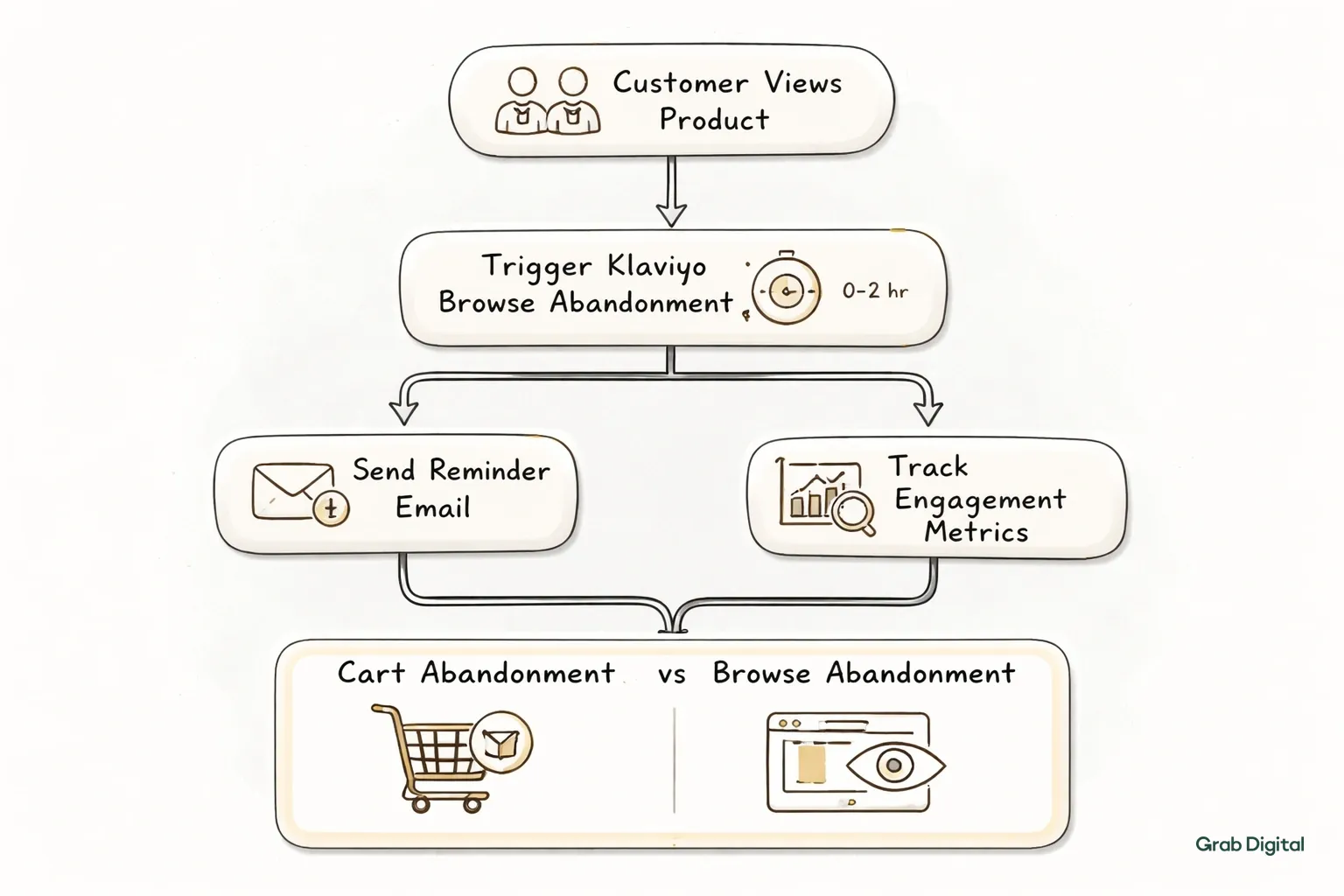
In Klaviyo, browse abandonment is a flow triggered when someone views a product page but doesn't add it to cart or make a purchase within a set window. It relies on the "Viewed Product" metric tracked through Klaviyo's Shopify integration or onsite tracking snippet.
This is different from cart abandonment, which fires after someone adds an item but exits before checkout. Browse abandonment catches earlier intent signals. It's the flow for the person who clicked through from an Instagram ad, looked at a product for 45 seconds, and then closed the tab. That person hasn't committed to anything yet, so the messaging needs to feel less transactional and more like a helpful nudge.
For this flow to work, your Klaviyo account needs accurate product view tracking. If you haven't already connected Shopify properly or verified your tracking snippet, check your setup before building anything on top of it. It's a common point of failure. Brands unsure about their current flow coverage can book your free consultation to get a full audit of what's tracking and what isn't.
Setting Up the Trigger and Filters
The browse abandonment trigger in Klaviyo starts with the "Viewed Product" metric, filtered to exclude anyone who already added to cart or purchased. This keeps the flow from overlapping with your cart abandonment sequence and sending duplicate messaging to the same person.
In Klaviyo's flow builder, you'll create a flow triggered by "Viewed Product," then add a time delay before the first email. Underneath that, you need filters: exclude people who have "Added to Cart" or "Placed Order" within a short window after the trigger, usually the same delay period. Without this filter, someone who views a product and then immediately buys it will still get a "forgot something?" email. That looks sloppy and undermines trust.
You'll also want to set a frequency cap. If someone views five products in an hour, they obviously shouldn't get five separate browse abandonment emails. Klaviyo lets you set flow filters that prevent re-entry into the same flow within a defined period, typically 24 to 48 hours. This single setting prevents the most common complaint about browse abandonment flows: email fatigue.
Timing: When to Send Each Email
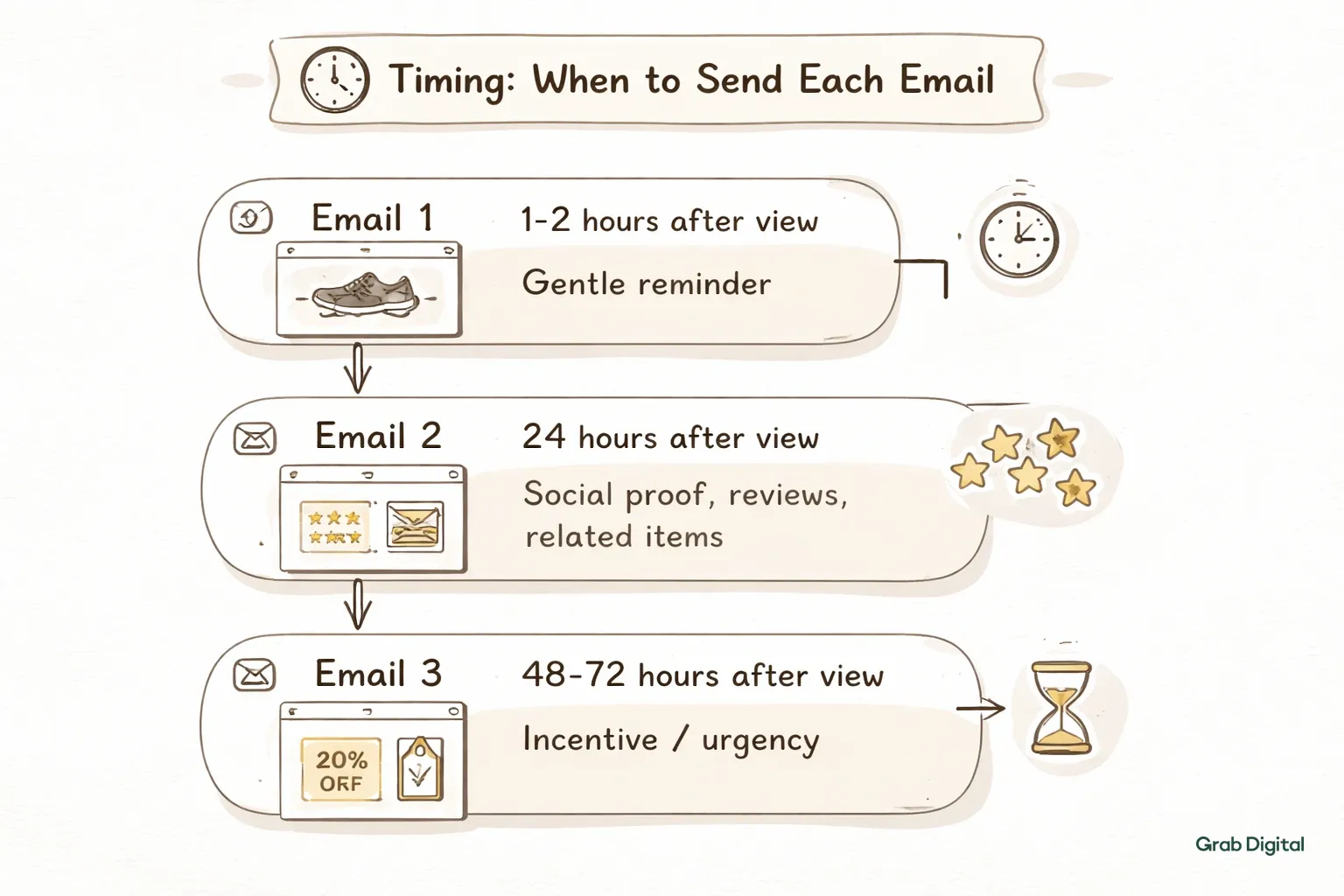
Browse abandonment timing works best as a three-email sequence sent over roughly 24 to 48 hours, starting 1 to 2 hours after the product view. Waiting too long loses the moment. Sending too fast feels intrusive and can read as creepy to shoppers who just left the page.
Here's a timing structure that works well for most DTC brands:
| Send Delay | Purpose | |
|---|---|---|
| Email 1 | 1 to 2 hours after view | Gentle reminder, same product shown |
| Email 2 | 24 hours after view | Social proof, reviews, related items |
| Email 3 | 48 to 72 hours after view | Incentive or urgency nudge |
The first email should land while the product is still fresh in memory, usually within the same day. The second email introduces reasons to trust the product: reviews, UGC, or comparison points. The third email is where a small incentive, like free shipping or a limited-time discount, can tip someone from "interested" to "bought."
Some brands push the first email even earlier, to 30 to 60 minutes, especially for higher-intent categories like apparel sizing or gift purchases. Testing this delay against your own audience matters more than copying a generic benchmark. Klaviyo's A/B testing tools inside the flow builder make it easy to split test delay windows without needing a separate campaign.
Writing Copy That Doesn't Feel Pushy
Browse abandonment copy should feel like a nudge, not a sales pitch. The first email works best with a casual, low-pressure tone that references the specific product viewed. Later emails in the sequence can introduce more direct calls to action as the window closes.
A common mistake is treating browse abandonment copy like cart abandonment copy. Cart abandonment can be more direct because the person already showed purchase intent by adding to cart. Browse abandonment needs a softer entry point. Subject lines like "Still thinking it over?" or "We saved this for you" perform better than anything that assumes a sale is imminent.
Structure for the first email should look something like this:
- Subject line referencing the product category, not a hard sell
- One line acknowledging they were browsing
- Product image and name, pulled dynamically
- A single, low-friction CTA like "Take another look"
- No discount code yet
By the second and third emails, you can introduce stronger language. Mention bestseller status, limited stock, or a small percentage-off code. This is also where email deliverability starts to matter more, since weaker engagement from cold recipients can hurt sender reputation if not managed carefully. Brands dealing with deliverability issues alongside flow building should look at how email deliverability impacts open rates before scaling send volume.
Copywriting consistency across flows matters too. Browse abandonment shouldn't sound like a totally different brand voice than your welcome email or cart abandonment sequence. I recommend reviewing your full flow library together at least once a quarter to keep tone aligned.
Building Dynamic Product Blocks
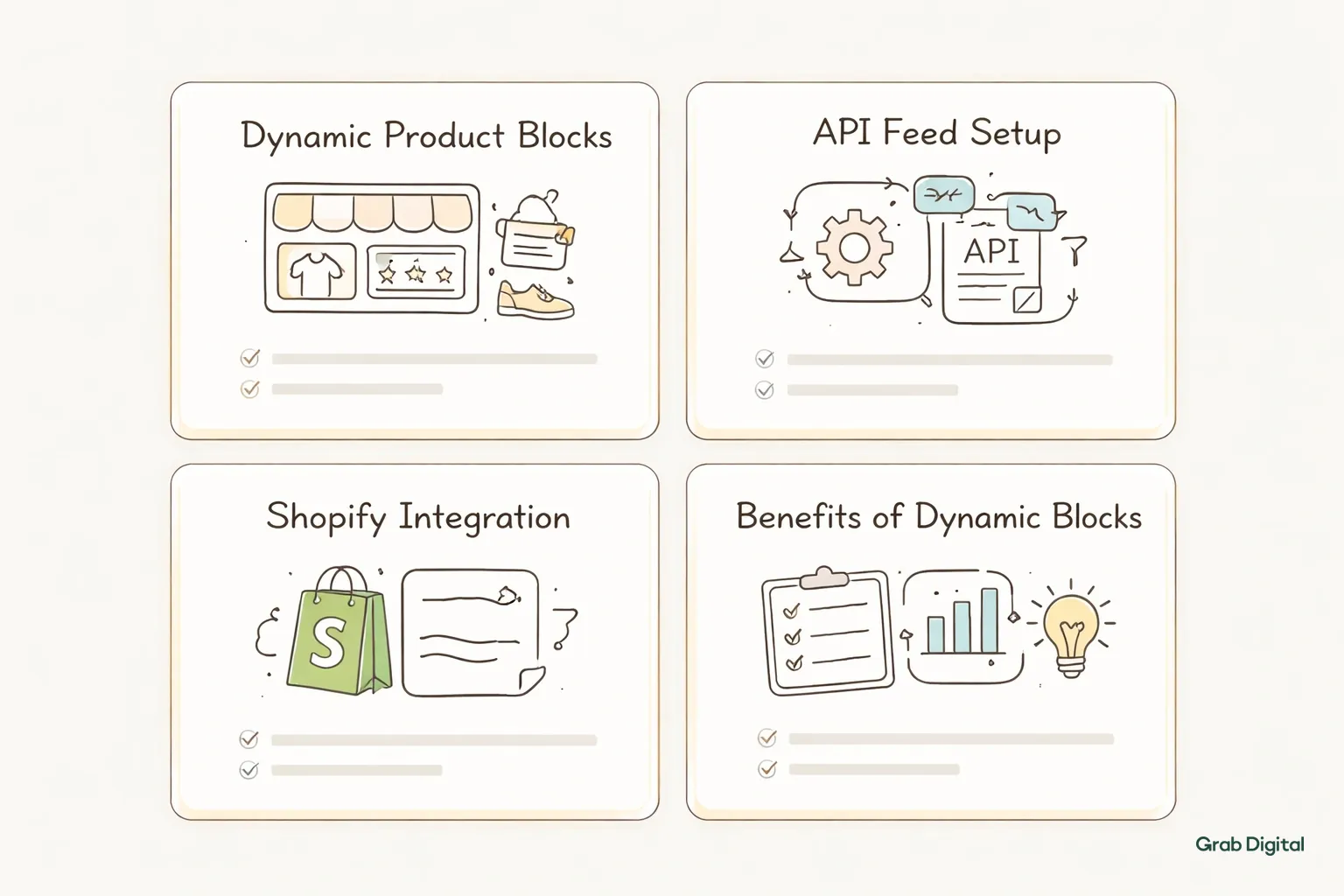
Product blocks in browse abandonment emails should pull dynamically from Klaviyo using the "Last Viewed Product" API feed or catalog feed, not static images. Dynamic blocks automatically update based on which product the recipient actually viewed, which keeps relevance high without manual work.
Klaviyo's product feed block, found under the content editor, connects directly to your Shopify catalog. When set up correctly, it shows the exact product someone viewed, along with price, image, and a direct link back to that product page. This is far more effective than generic "check out our bestsellers" blocks because it matches what the shopper actually cared about.
For the second email in the sequence, consider adding a secondary product block showing related or complementary items. If someone viewed a leather wallet, showing a matching belt or card holder in the same email can increase average order value. This works especially well for brands with a cohesive product line, similar to how a brand selling leather goods might cross-merchandise accessories.
Before launching, make sure you confirm your Shopify product catalog is synced to Klaviyo, use the "Viewed Product" dynamic variable inside the email template, test across at least three product categories, and check mobile rendering. A product block that looks perfect on desktop can collapse awkwardly on mobile Gmail, which is where a large share of opens happen. Also confirm pricing displays correctly if you run frequent promotions. Running this QA before launch avoids broken emails going out to your full browse abandonment segment.
Measuring Performance and Making Adjustments
Browse abandonment performance should be measured by click-through rate on product blocks, not just open rate. Open rate tells you the subject line worked. Click-through and conversion rate tell you whether the product block and copy actually moved someone back to the site.
Klaviyo's flow reporting shows revenue per recipient for each email in the sequence, which is the most useful single metric here. If email one in your sequence drives most of the revenue and emails two and three barely contribute, that's a signal to rework the later sends rather than scrap the whole flow. Conversely, if email three with the discount code outperforms the others significantly, that tells you shoppers in this segment need a stronger incentive to convert.
Segmentation can sharpen this further. Running separate browse abandonment flows for different product categories, say skincare versus home goods, often outperforms one generic flow for the whole catalog. This ties into broader customer segmentation strategies that most mature Klaviyo accounts eventually need regardless of which flow you're optimizing.
Here are the benchmark ranges to watch for, though I'll be the first to admit these vary heavily by vertical:
- Open rate: 40 to 55%
- Click rate: 5 to 12%
- Conversion rate: 2 to 5%
- Revenue per recipient: varies heavily by average order value
If your numbers sit well below these ranges, the issue is usually either tracking setup, timing delays, or weak product block relevance rather than the concept of browse abandonment itself.
Where Browse Abandonment Fits in Your Broader Flow Strategy
Browse abandonment is one of several automated flows that should work together, not in isolation. It sits alongside welcome series, cart abandonment, and post-purchase flows as part of a complete lifecycle email system.
Brands that build browse abandonment without the surrounding infrastructure often see mediocre results because the flow isn't reinforced by consistent list hygiene or segmentation elsewhere. A clean, engaged list makes every flow perform better, including this one. Reviewing your core email flows as a complete system rather than one-off builds tends to produce stronger results across the board.
Popup optimization also feeds into this flow indirectly. Visitors who sign up through a well-designed popup tend to be warmer leads, which means their browse abandonment emails convert at higher rates than cold traffic. If popup capture rates are low, that's worth fixing before investing heavily in flow copy. Teams managing this across multiple flows at once often find it easier to book your free consultation and get a strategist to map the whole system rather than patching individual flows piecemeal.
For brands generating under 20% of revenue through email, browse abandonment combined with a solid cart abandonment sequence is often the fastest lever to pull. Both flows run on existing traffic, meaning no added ad spend is required to see incremental revenue.
Frequently Asked Questions
How long should I wait before sending the first browse abandonment email? Most DTC brands see the best results sending the first email 1 to 2 hours after the product view. Waiting longer than a few hours tends to lose the moment, since shopper intent fades quickly after the browsing session ends.
Can browse abandonment and cart abandonment flows overlap? They shouldn't. Set a filter in Klaviyo excluding anyone who added to cart or purchased after viewing, so the two flows don't send duplicate messaging to the same shopper at the same time.
Do I need a discount code in every browse abandonment email? No. The first email should avoid discounts entirely to keep the tone low-pressure. Save any incentive for the second or third email, where a small nudge can help convert someone still on the fence.
What's the ideal number of emails in a browse abandonment sequence? Three emails spread across 24 to 72 hours works well for most DTC brands. More than that risks email fatigue, especially since browsing behavior is a lower-intent signal than cart abandonment.
How do I know if my product blocks are set up correctly? Test the flow yourself by viewing a few different products on your site and checking that the correct item appears in the email. Also check mobile rendering, since product blocks frequently break on smaller screens if not built properly.
Should browse abandonment flows be different for each product category? For catalogs with distinct product types, yes. Segmenting browse abandonment by category and tailoring copy and product blocks accordingly typically outperforms a single generic flow applied across the whole catalog.
Most DTC brands set up an abandoned cart flow and call it a day. But cart abandonment only catches people who actually clicked "Add to Cart." What about everyone else? Browse abandonment emails target shoppers who viewed products but never added them to their cart. They're triggered by Klaviyo's browse abandonment metric and sent within 1 to 4 hours of the last product view. When done right, they recover interest before it fades and turn casual browsers into buyers. Getting the timing, copy, and product blocks right determines whether this flow becomes a quiet revenue driver or just another email people ignore.
What Is Browse Abandonment in Klaviyo
In Klaviyo, browse abandonment is a flow triggered when someone views a product page but doesn't add it to cart or make a purchase within a set window. It relies on the "Viewed Product" metric tracked through Klaviyo's Shopify integration or onsite tracking snippet.
This is different from cart abandonment, which fires after someone adds an item but exits before checkout. Browse abandonment catches earlier intent signals. It's the flow for the person who clicked through from an Instagram ad, looked at a product for 45 seconds, and then closed the tab. That person hasn't committed to anything yet, so the messaging needs to feel less transactional and more like a helpful nudge.
For this flow to work, your Klaviyo account needs accurate product view tracking. If you haven't already connected Shopify properly or verified your tracking snippet, check your setup before building anything on top of it. It's a common point of failure. Brands unsure about their current flow coverage can book your free consultation to get a full audit of what's tracking and what isn't.
Setting Up the Trigger and Filters
The browse abandonment trigger in Klaviyo starts with the "Viewed Product" metric, filtered to exclude anyone who already added to cart or purchased. This keeps the flow from overlapping with your cart abandonment sequence and sending duplicate messaging to the same person.
In Klaviyo's flow builder, you'll create a flow triggered by "Viewed Product," then add a time delay before the first email. Underneath that, you need filters: exclude people who have "Added to Cart" or "Placed Order" within a short window after the trigger, usually the same delay period. Without this filter, someone who views a product and then immediately buys it will still get a "forgot something?" email. That looks sloppy and undermines trust.
You'll also want to set a frequency cap. If someone views five products in an hour, they obviously shouldn't get five separate browse abandonment emails. Klaviyo lets you set flow filters that prevent re-entry into the same flow within a defined period, typically 24 to 48 hours. This single setting prevents the most common complaint about browse abandonment flows: email fatigue.
Timing: When to Send Each Email
Browse abandonment timing works best as a three-email sequence sent over roughly 24 to 48 hours, starting 1 to 2 hours after the product view. Waiting too long loses the moment. Sending too fast feels intrusive and can read as creepy to shoppers who just left the page.
Here's a timing structure that works well for most DTC brands:
| Send Delay | Purpose | |
|---|---|---|
| Email 1 | 1 to 2 hours after view | Gentle reminder, same product shown |
| Email 2 | 24 hours after view | Social proof, reviews, related items |
| Email 3 | 48 to 72 hours after view | Incentive or urgency nudge |
The first email should land while the product is still fresh in memory, usually within the same day. The second email introduces reasons to trust the product: reviews, UGC, or comparison points. The third email is where a small incentive, like free shipping or a limited-time discount, can tip someone from "interested" to "bought."
Some brands push the first email even earlier, to 30 to 60 minutes, especially for higher-intent categories like apparel sizing or gift purchases. Testing this delay against your own audience matters more than copying a generic benchmark. Klaviyo's A/B testing tools inside the flow builder make it easy to split test delay windows without needing a separate campaign.
Writing Copy That Doesn't Feel Pushy
Browse abandonment copy should feel like a nudge, not a sales pitch. The first email works best with a casual, low-pressure tone that references the specific product viewed. Later emails in the sequence can introduce more direct calls to action as the window closes.
A common mistake is treating browse abandonment copy like cart abandonment copy. Cart abandonment can be more direct because the person already showed purchase intent by adding to cart. Browse abandonment needs a softer entry point. Subject lines like "Still thinking it over?" or "We saved this for you" perform better than anything that assumes a sale is imminent.
Structure for the first email should look something like this:
- Subject line referencing the product category, not a hard sell
- One line acknowledging they were browsing
- Product image and name, pulled dynamically
- A single, low-friction CTA like "Take another look"
- No discount code yet
By the second and third emails, you can introduce stronger language. Mention bestseller status, limited stock, or a small percentage-off code. This is also where email deliverability starts to matter more, since weaker engagement from cold recipients can hurt sender reputation if not managed carefully. Brands dealing with deliverability issues alongside flow building should look at how email deliverability impacts open rates before scaling send volume.
Copywriting consistency across flows matters too. Browse abandonment shouldn't sound like a totally different brand voice than your welcome email or cart abandonment sequence. I recommend reviewing your full flow library together at least once a quarter to keep tone aligned.
Building Dynamic Product Blocks
Product blocks in browse abandonment emails should pull dynamically from Klaviyo using the "Last Viewed Product" API feed or catalog feed, not static images. Dynamic blocks automatically update based on which product the recipient actually viewed, which keeps relevance high without manual work.
Klaviyo's product feed block, found under the content editor, connects directly to your Shopify catalog. When set up correctly, it shows the exact product someone viewed, along with price, image, and a direct link back to that product page. This is far more effective than generic "check out our bestsellers" blocks because it matches what the shopper actually cared about.
For the second email in the sequence, consider adding a secondary product block showing related or complementary items. If someone viewed a leather wallet, showing a matching belt or card holder in the same email can increase average order value. This works especially well for brands with a cohesive product line, similar to how a brand selling leather goods might cross-merchandise accessories.
Before launching, make sure you confirm your Shopify product catalog is synced to Klaviyo, use the "Viewed Product" dynamic variable inside the email template, test across at least three product categories, and check mobile rendering. A product block that looks perfect on desktop can collapse awkwardly on mobile Gmail, which is where a large share of opens happen. Also confirm pricing displays correctly if you run frequent promotions. Running this QA before launch avoids broken emails going out to your full browse abandonment segment.
Measuring Performance and Making Adjustments
Browse abandonment performance should be measured by click-through rate on product blocks, not just open rate. Open rate tells you the subject line worked. Click-through and conversion rate tell you whether the product block and copy actually moved someone back to the site.
Klaviyo's flow reporting shows revenue per recipient for each email in the sequence, which is the most useful single metric here. If email one in your sequence drives most of the revenue and emails two and three barely contribute, that's a signal to rework the later sends rather than scrap the whole flow. Conversely, if email three with the discount code outperforms the others significantly, that tells you shoppers in this segment need a stronger incentive to convert.
Segmentation can sharpen this further. Running separate browse abandonment flows for different product categories, say skincare versus home goods, often outperforms one generic flow for the whole catalog. This ties into broader customer segmentation strategies that most mature Klaviyo accounts eventually need regardless of which flow you're optimizing.
Here are the benchmark ranges to watch for, though I'll be the first to admit these vary heavily by vertical:
- Open rate: 40 to 55%
- Click rate: 5 to 12%
- Conversion rate: 2 to 5%
- Revenue per recipient: varies heavily by average order value
If your numbers sit well below these ranges, the issue is usually either tracking setup, timing delays, or weak product block relevance rather than the concept of browse abandonment itself.
Where Browse Abandonment Fits in Your Broader Flow Strategy
Browse abandonment is one of several automated flows that should work together, not in isolation. It sits alongside welcome series, cart abandonment, and post-purchase flows as part of a complete lifecycle email system.
Brands that build browse abandonment without the surrounding infrastructure often see mediocre results because the flow isn't reinforced by consistent list hygiene or segmentation elsewhere. A clean, engaged list makes every flow perform better, including this one. Reviewing your core email flows as a complete system rather than one-off builds tends to produce stronger results across the board.
Popup optimization also feeds into this flow indirectly. Visitors who sign up through a well-designed popup tend to be warmer leads, which means their browse abandonment emails convert at higher rates than cold traffic. If popup capture rates are low, that's worth fixing before investing heavily in flow copy. Teams managing this across multiple flows at once often find it easier to book your free consultation and get a strategist to map the whole system rather than patching individual flows piecemeal.
For brands generating under 20% of revenue through email, browse abandonment combined with a solid cart abandonment sequence is often the fastest lever to pull. Both flows run on existing traffic, meaning no added ad spend is required to see incremental revenue.
Frequently Asked Questions
How long should I wait before sending the first browse abandonment email? Most DTC brands see the best results sending the first email 1 to 2 hours after the product view. Waiting longer than a few hours tends to lose the moment, since shopper intent fades quickly after the browsing session ends.
Can browse abandonment and cart abandonment flows overlap? They shouldn't. Set a filter in Klaviyo excluding anyone who added to cart or purchased after viewing, so the two flows don't send duplicate messaging to the same shopper at the same time.
Do I need a discount code in every browse abandonment email? No. The first email should avoid discounts entirely to keep the tone low-pressure. Save any incentive for the second or third email, where a small nudge can help convert someone still on the fence.
What's the ideal number of emails in a browse abandonment sequence? Three emails spread across 24 to 72 hours works well for most DTC brands. More than that risks email fatigue, especially since browsing behavior is a lower-intent signal than cart abandonment.
How do I know if my product blocks are set up correctly? Test the flow yourself by viewing a few different products on your site and checking that the correct item appears in the email. Also check mobile rendering, since product blocks frequently break on smaller screens if not built properly.
Should browse abandonment flows be different for each product category? For catalogs with distinct product types, yes. Segmenting browse abandonment by category and tailoring copy and product blocks accordingly typically outperforms a single generic flow applied across the whole catalog.

Find out exactly what your email channel is leaving on the table.

Email Marketing for Scaling DTC Brands


