
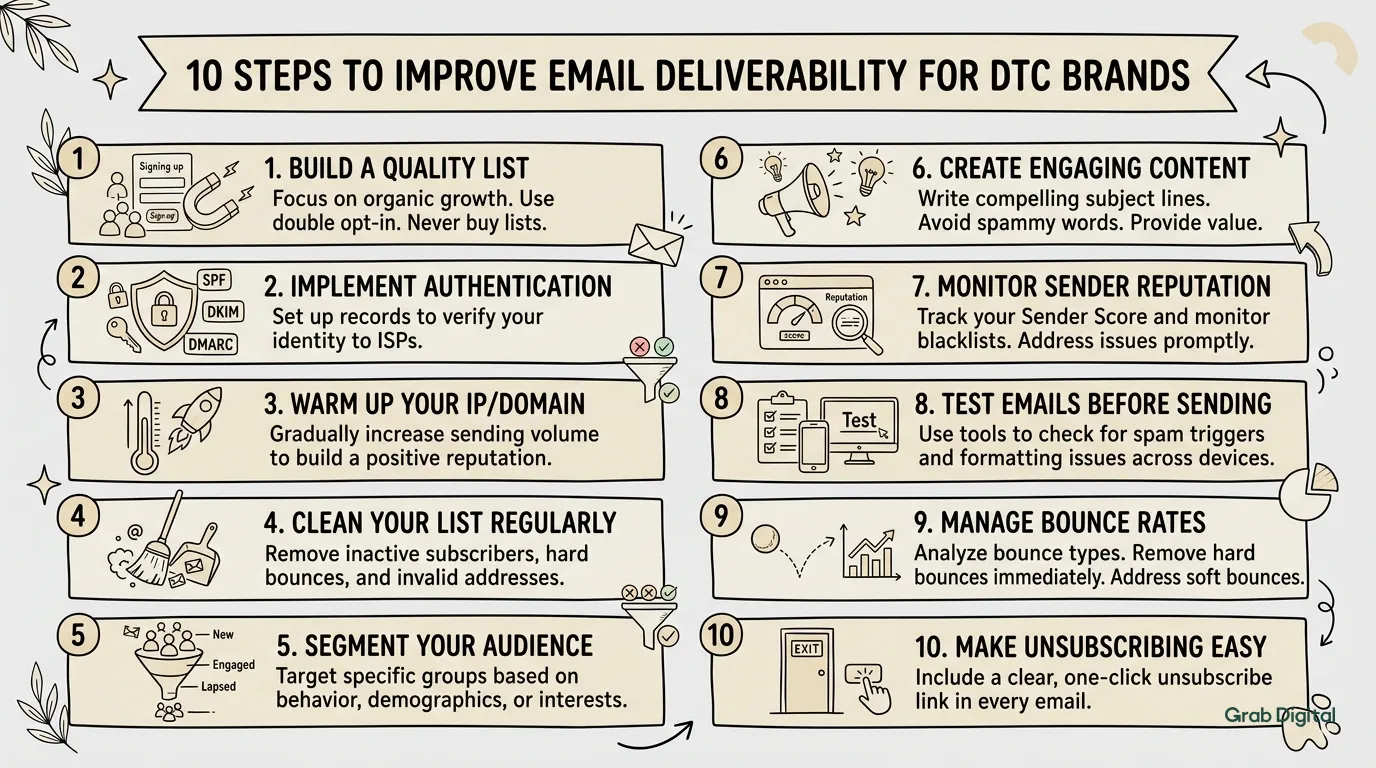
Summary
Email Deliverability for DTC Brands: 10 Essential Tips
You can spend hours crafting the perfect email clean design, sharp copy, subject line A/B tested within an inch of its life. None of it matters if it lands in spam. For DTC brands where email drives 20–35% of revenue, deliverability isn't a detail. It's the whole ballgame.
Spam filters kill open rates and destroy engagement, but deliverability isn't mysterious. It's a mix of technical setup, content choices, and list hygiene. Here is how to keep your emails where they belong.
Why Emails Go to Spam
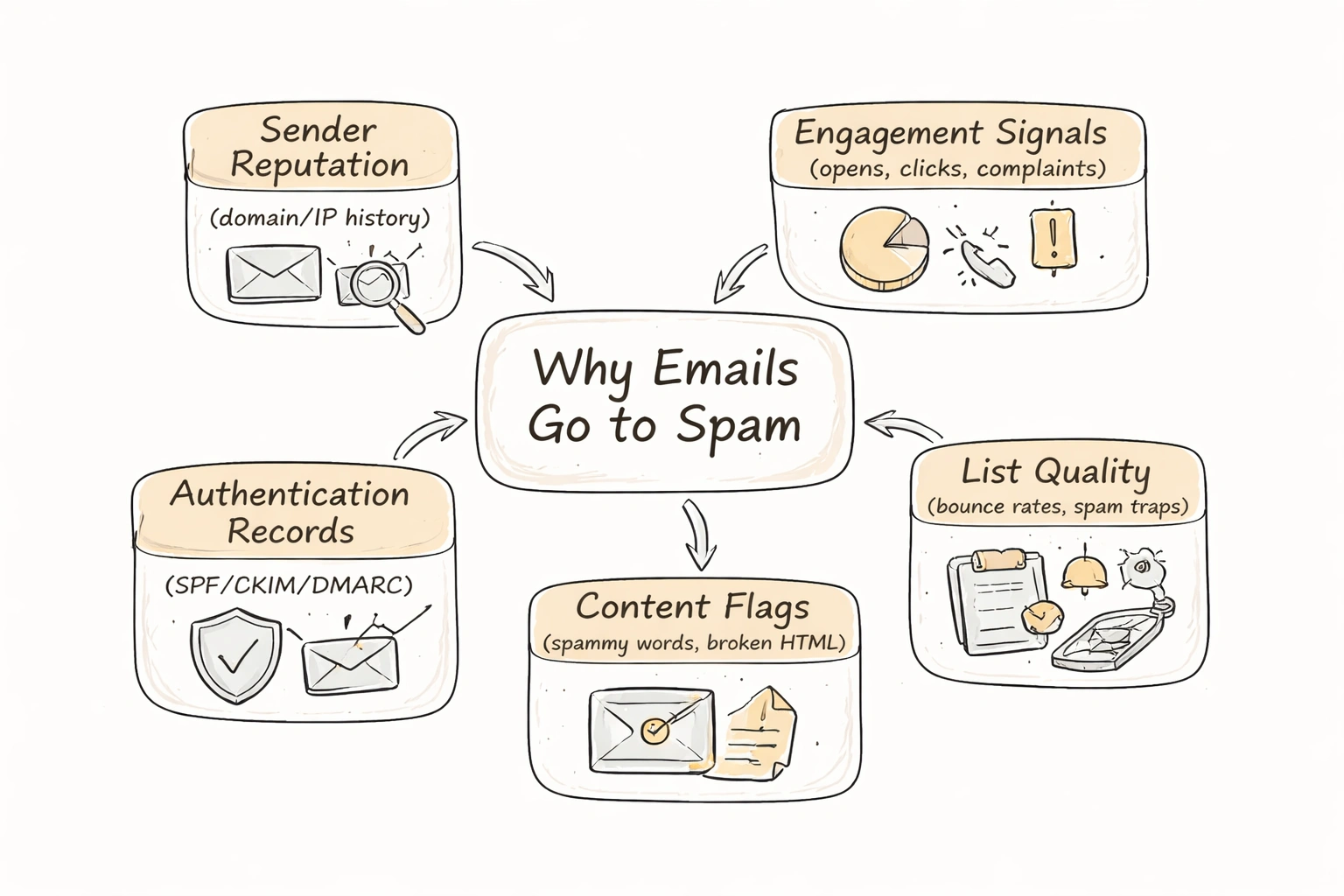
Gmail, Outlook, and Yahoo don't filter emails randomly. They evaluate specific signals to decide if you're trustworthy or a nuisance.
They look at your sender reputation (your domain and IP history) and engagement signals (opens, clicks, complaints). They check your authentication records proof you are who you say you are. They also scan for content flags like spammy words or broken HTML, and assess list quality, noting bounce rates and spam trap hits.
Raise a red flag in any of these areas, and you get filtered. Recovery is hard, so it is better to get it right upfront.
Step 1: Authenticate Your Sending Domain
This is the boring technical stuff you cannot skip. Without authentication, you look suspicious to inbox providers.
You need three records set up in your DNS.
SPF (Sender Policy Framework) tells servers which IPs can send email for your domain. In Klaviyo, you add a TXT record. The platform gives you the exact string.
DKIM (DomainKeys Identified Mail) adds a digital signature verifying the message wasn't tampered with. Klaviyo generates this for you.
DMARC (Domain-based Message Authentication, Reporting & Conformance) tells servers what to do if an email fails authentication quarantine, reject, or let it pass. It also sends reports on who is trying to spoof your domain.
A basic record looks like this:
v=DMARC1; p=none; rua=mailto:dmarc@yourdomain.com
Start with p=none to monitor activity. Switch to p=quarantine or p=reject once you trust your setup. If you don't know how to edit DNS records, ask your developer. Do this before you send a single campaign.
Step 2: Use a Dedicated Sending Domain
Sending from a generic Gmail address or your root domain without segmentation is risky. Use a subdomain. If your site is yourbrand.com, send from email.yourbrand.com or hello.yourbrand.com.
This isolates your email reputation. If your email practices damage your reputation, your main website domain stays safe. Klaviyo makes this setup easy. You authenticate the subdomain, and it appears as your "from" address.
Step 3: Warm Up Your Domain and IP
You cannot start sending 50,000 emails a day from a new IP. Inbox providers will assume you are a spammer.
Start small. Send to your most engaged subscribers first people who open and click regularly. Send 500–1,000 emails, then ramp up volume over 2–4 weeks.
Klaviyo puts newer brands on shared IP pools, which helps because those IPs have history. Once you pass 100K–200K emails monthly, consider a dedicated IP. If you switch ESPs, do not import and blast. Warm up the new domain with engaged segments first.
Step 4: Clean Your Email List Regularly
Sending to people who ignore you is one of the fastest ways to ruin deliverability.
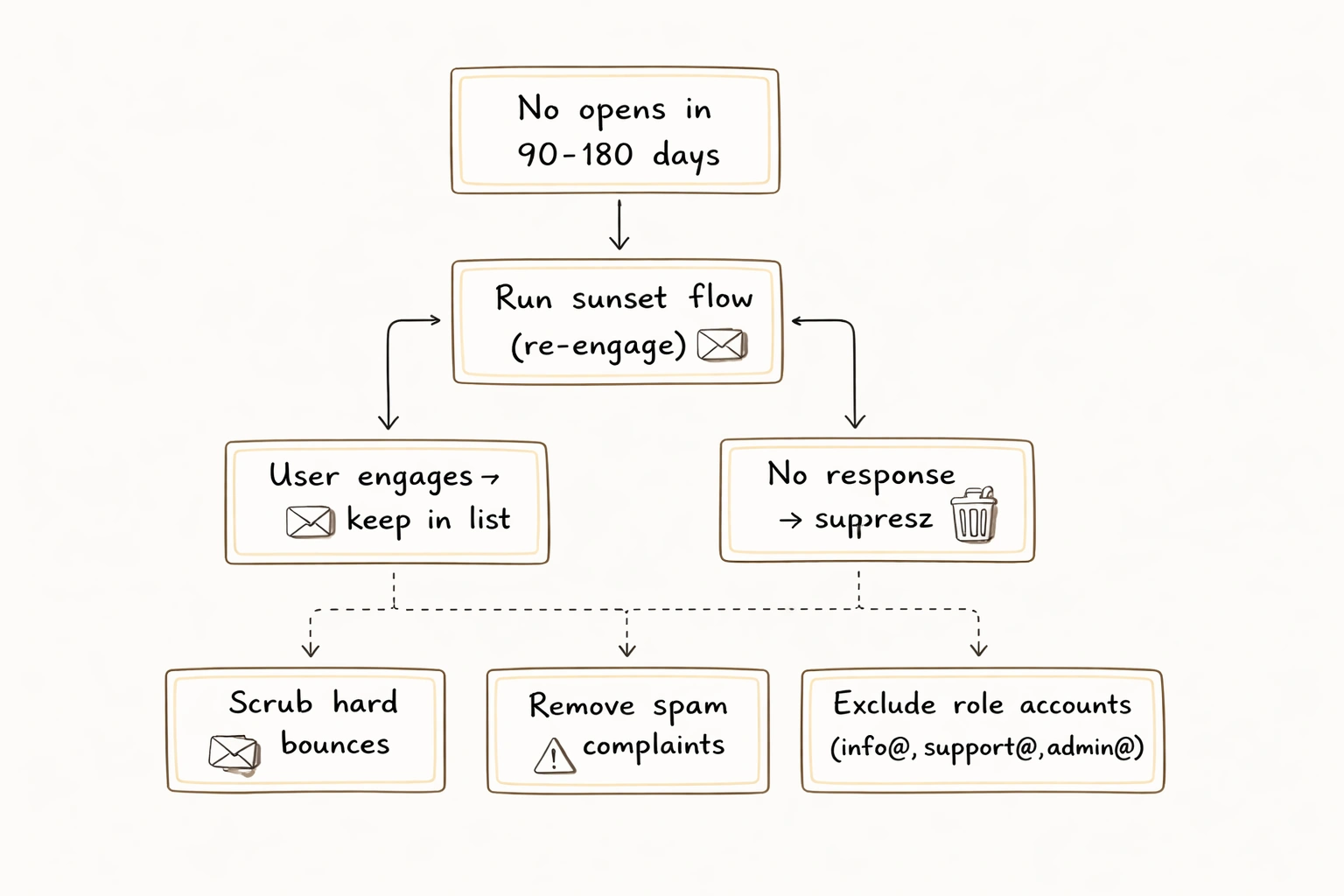
If someone hasn't opened in 90–180 days, they are hurting you. They lower your engagement metrics, signaling to inbox providers that your emails aren't wanted.
Run a sunset flow to re-engage them. If they don't respond, suppress them.
Also scrub for hard bounces (invalid addresses), spam complaints (people who marked you as spam), and role accounts (emails like info@, support@, admin@). These rarely engage and often flag spam.
Klaviyo handles suppression management. Use it. Book your free consultation if you need help auditing your list. Most brands should suppress 5–10% of their list annually. If you aren't, you are probably sending to ghosts.
Step 5: Write Like a Human, Not a Spammer
Good technical setup doesn't save you if your content looks spammy.
Avoid ALL CAPS subject lines and excessive exclamation marks!!!!! Stay away from trigger words like "free," "guarantee," "click here," and "act now." Don't use misleading subject lines or too many links, especially shortened ones like bit.ly. Large images with little text also raise flags.
Write like a person.
Bad: FREE SHIPPING!!! BUY NOW BEFORE IT'S TOO LATE!!! Good: Your cart misses you (and we'll cover shipping)
Always include a plain-text version. Klaviyo generates this, but check it. Some providers prefer text, and it proves you are legitimate.
Step 6: Make It Easy to Unsubscribe
This sounds counterintuitive, but hiding your unsubscribe link increases spam complaints. Complaints hurt you more than unsubscribes.
Put a clear link in every email. It is legally required, and it protects your sender reputation. You want a clean exit, not a mark against your domain.
Step 7: Monitor Engagement and Adjust
Deliverability requires maintenance. Watch these metrics in Klaviyo.
Placement rate shows inbox vs. spam. Use tools like Litmus or GlockApps. Open rate by domain is critical if Gmail users open less than others, you have a problem. Keep bounce rate under 2%. Keep spam complaint rate under 0.1%; anything above 0.3% is an emergency. Unsubscribe rate should stay under 0.5%.
If open rates drop or bounces spike, investigate immediately. Check your authentication, list quality, and content.
Step 8: Segment and Personalize
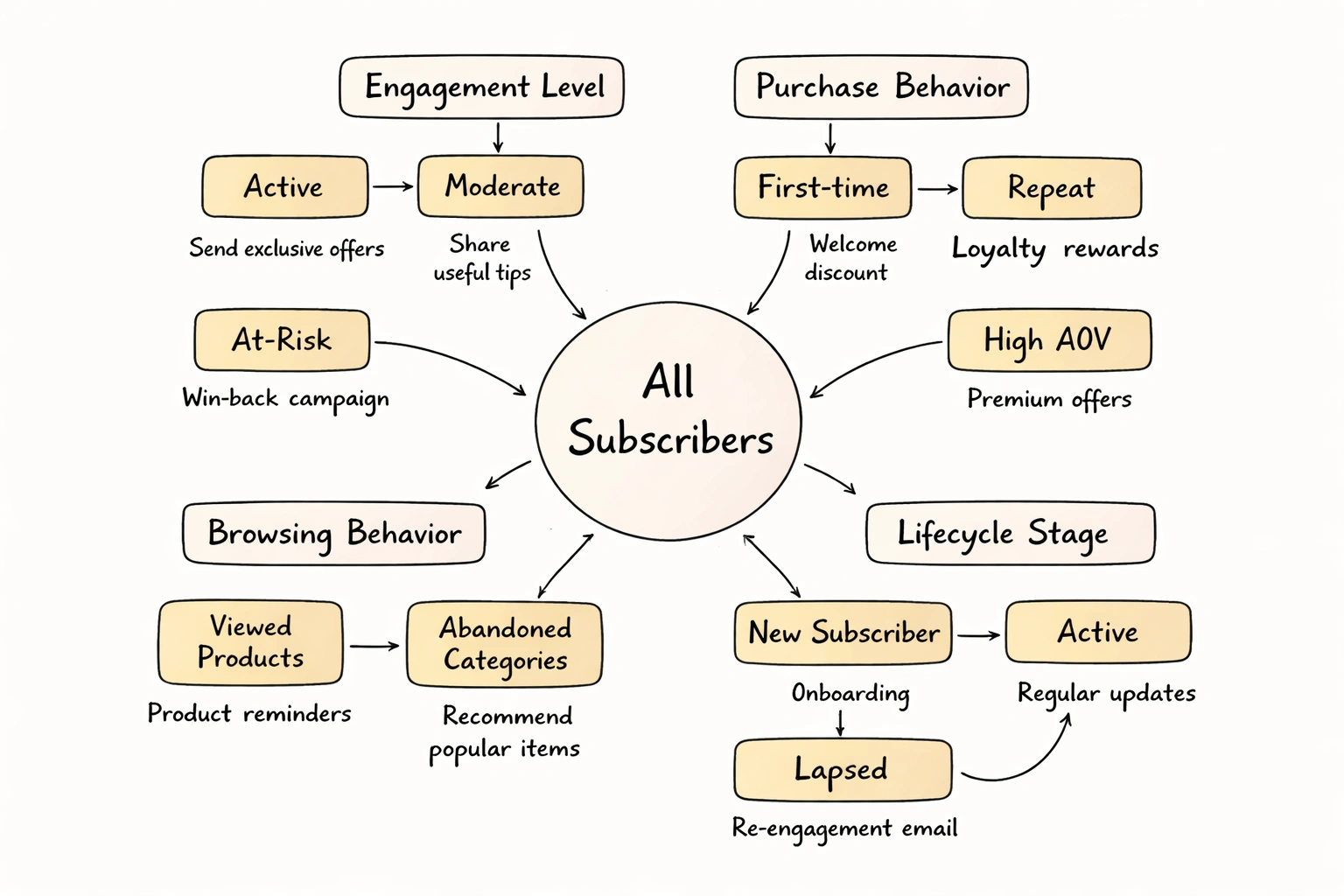
Batch-and-blast kills engagement. Segmentation improves relevance, which improves engagement, which improves deliverability.
Segment by engagement level (active, moderate, at-risk), purchase behavior (first-time, repeat, high AOV), browsing behavior (viewed products, abandoned categories), and lifecycle stage (new subscriber, active, lapsed).
Send targeted content. Engaged subscribers can handle frequency. At-risk ones need a lighter touch. For deeper strategies, see our post on email segmentation.
Step 9: Test Before You Send
Broken HTML and dead links hurt you.
Before every campaign, preview in Gmail, Outlook, Apple Mail, and mobile. Click every link. Check images. Run a spam test using Mail Tester or Litmus.
Use Klaviyo's preview features. Catching one broken link is worth the extra minute.
Step 10: Use Double Opt-In (When It Makes Sense)
Double opt-in requires subscribers to confirm their address. It shrinks your list size but improves quality. You only email people who actually want to hear from you.
For most DTC brands collecting emails on their own site, single opt-in is fine. But if you are running aggressive lead gen or buying traffic, double opt-in is a useful safeguard.
What to Do If You're Already in Spam
If you are already filtered, here is the fix.
First, audit your authentication. Check SPF, DKIM, DMARC. Second, clean the list hard. Suppress anyone inactive for 90+ days. Third, mail only your best subscribers for 2–4 weeks to rebuild reputation. Fourth, review content and remove spam triggers. Fifth, monitor daily and watch for improvement. Finally, consider a dedicated IP if a shared pool is dragging you down.
Recovery takes time, but you will see improvement if you stick to it.
Deliverability Is Revenue
Emails in spam generate zero revenue. They build no relationships.
Deliverability is the difference between a channel that drives 30% of revenue and one that drives 5%. For DTC brands, that is the difference between growing and flatlining.
Treat it like infrastructure. Build it right and maintain it. If you need help, we handle deliverability audits, list hygiene, and setup for brands on Klaviyo. Learn more about our services or reach out.
Frequently Asked Questions
Q: What's the most common reason emails go to spam? A: Bad list quality. Sending to unengaged, old, or purchased lists is the main culprit. Clean your list and email people who actually want to hear from you.
Q: Do I need a dedicated IP? A: Not always. Brands sending under 100K emails monthly usually do fine on shared IPs in Klaviyo. Dedicated IPs are for high-volume senders who want total control, but they require maintenance.
Q: How do I know if I'm in spam? A: Use placement tools like GlockApps or Mail Tester. Also watch open rates by domain. If Gmail opens are low, investigate.
Q: Can I recover from a spam complaint spike? A: Yes. Suppress complainers, clean the list, and mail only engaged subscribers for a few weeks. It takes time, but reputation rebuilds.
Q: Should I use a "no-reply" address? A: No. It signals you don't want to talk to customers, which hurts engagement. Use a real address like hello@yourbrand.com.
Q: How often should I clean my list? A: Quarterly. Run a sunset flow every 90–180 days. Suppress bounces and complaints immediately.
You can spend hours crafting the perfect email clean design, sharp copy, subject line A/B tested within an inch of its life. None of it matters if it lands in spam. For DTC brands where email drives 20–35% of revenue, deliverability isn't a detail. It's the whole ballgame.
Spam filters kill open rates and destroy engagement, but deliverability isn't mysterious. It's a mix of technical setup, content choices, and list hygiene. Here is how to keep your emails where they belong.
Why Emails Go to Spam
Gmail, Outlook, and Yahoo don't filter emails randomly. They evaluate specific signals to decide if you're trustworthy or a nuisance.
They look at your sender reputation (your domain and IP history) and engagement signals (opens, clicks, complaints). They check your authentication records proof you are who you say you are. They also scan for content flags like spammy words or broken HTML, and assess list quality, noting bounce rates and spam trap hits.
Raise a red flag in any of these areas, and you get filtered. Recovery is hard, so it is better to get it right upfront.
Step 1: Authenticate Your Sending Domain
This is the boring technical stuff you cannot skip. Without authentication, you look suspicious to inbox providers.
You need three records set up in your DNS.
SPF (Sender Policy Framework) tells servers which IPs can send email for your domain. In Klaviyo, you add a TXT record. The platform gives you the exact string.
DKIM (DomainKeys Identified Mail) adds a digital signature verifying the message wasn't tampered with. Klaviyo generates this for you.
DMARC (Domain-based Message Authentication, Reporting & Conformance) tells servers what to do if an email fails authentication quarantine, reject, or let it pass. It also sends reports on who is trying to spoof your domain.
A basic record looks like this:
v=DMARC1; p=none; rua=mailto:dmarc@yourdomain.com
Start with p=none to monitor activity. Switch to p=quarantine or p=reject once you trust your setup. If you don't know how to edit DNS records, ask your developer. Do this before you send a single campaign.
Step 2: Use a Dedicated Sending Domain
Sending from a generic Gmail address or your root domain without segmentation is risky. Use a subdomain. If your site is yourbrand.com, send from email.yourbrand.com or hello.yourbrand.com.
This isolates your email reputation. If your email practices damage your reputation, your main website domain stays safe. Klaviyo makes this setup easy. You authenticate the subdomain, and it appears as your "from" address.
Step 3: Warm Up Your Domain and IP
You cannot start sending 50,000 emails a day from a new IP. Inbox providers will assume you are a spammer.
Start small. Send to your most engaged subscribers first people who open and click regularly. Send 500–1,000 emails, then ramp up volume over 2–4 weeks.
Klaviyo puts newer brands on shared IP pools, which helps because those IPs have history. Once you pass 100K–200K emails monthly, consider a dedicated IP. If you switch ESPs, do not import and blast. Warm up the new domain with engaged segments first.
Step 4: Clean Your Email List Regularly
Sending to people who ignore you is one of the fastest ways to ruin deliverability.
If someone hasn't opened in 90–180 days, they are hurting you. They lower your engagement metrics, signaling to inbox providers that your emails aren't wanted.
Run a sunset flow to re-engage them. If they don't respond, suppress them.
Also scrub for hard bounces (invalid addresses), spam complaints (people who marked you as spam), and role accounts (emails like info@, support@, admin@). These rarely engage and often flag spam.
Klaviyo handles suppression management. Use it. Book your free consultation if you need help auditing your list. Most brands should suppress 5–10% of their list annually. If you aren't, you are probably sending to ghosts.
Step 5: Write Like a Human, Not a Spammer
Good technical setup doesn't save you if your content looks spammy.
Avoid ALL CAPS subject lines and excessive exclamation marks!!!!! Stay away from trigger words like "free," "guarantee," "click here," and "act now." Don't use misleading subject lines or too many links, especially shortened ones like bit.ly. Large images with little text also raise flags.
Write like a person.
Bad: FREE SHIPPING!!! BUY NOW BEFORE IT'S TOO LATE!!! Good: Your cart misses you (and we'll cover shipping)
Always include a plain-text version. Klaviyo generates this, but check it. Some providers prefer text, and it proves you are legitimate.
Step 6: Make It Easy to Unsubscribe
This sounds counterintuitive, but hiding your unsubscribe link increases spam complaints. Complaints hurt you more than unsubscribes.
Put a clear link in every email. It is legally required, and it protects your sender reputation. You want a clean exit, not a mark against your domain.
Step 7: Monitor Engagement and Adjust
Deliverability requires maintenance. Watch these metrics in Klaviyo.
Placement rate shows inbox vs. spam. Use tools like Litmus or GlockApps. Open rate by domain is critical if Gmail users open less than others, you have a problem. Keep bounce rate under 2%. Keep spam complaint rate under 0.1%; anything above 0.3% is an emergency. Unsubscribe rate should stay under 0.5%.
If open rates drop or bounces spike, investigate immediately. Check your authentication, list quality, and content.
Step 8: Segment and Personalize
Batch-and-blast kills engagement. Segmentation improves relevance, which improves engagement, which improves deliverability.
Segment by engagement level (active, moderate, at-risk), purchase behavior (first-time, repeat, high AOV), browsing behavior (viewed products, abandoned categories), and lifecycle stage (new subscriber, active, lapsed).
Send targeted content. Engaged subscribers can handle frequency. At-risk ones need a lighter touch. For deeper strategies, see our post on email segmentation.
Step 9: Test Before You Send
Broken HTML and dead links hurt you.
Before every campaign, preview in Gmail, Outlook, Apple Mail, and mobile. Click every link. Check images. Run a spam test using Mail Tester or Litmus.
Use Klaviyo's preview features. Catching one broken link is worth the extra minute.
Step 10: Use Double Opt-In (When It Makes Sense)
Double opt-in requires subscribers to confirm their address. It shrinks your list size but improves quality. You only email people who actually want to hear from you.
For most DTC brands collecting emails on their own site, single opt-in is fine. But if you are running aggressive lead gen or buying traffic, double opt-in is a useful safeguard.
What to Do If You're Already in Spam
If you are already filtered, here is the fix.
First, audit your authentication. Check SPF, DKIM, DMARC. Second, clean the list hard. Suppress anyone inactive for 90+ days. Third, mail only your best subscribers for 2–4 weeks to rebuild reputation. Fourth, review content and remove spam triggers. Fifth, monitor daily and watch for improvement. Finally, consider a dedicated IP if a shared pool is dragging you down.
Recovery takes time, but you will see improvement if you stick to it.
Deliverability Is Revenue
Emails in spam generate zero revenue. They build no relationships.
Deliverability is the difference between a channel that drives 30% of revenue and one that drives 5%. For DTC brands, that is the difference between growing and flatlining.
Treat it like infrastructure. Build it right and maintain it. If you need help, we handle deliverability audits, list hygiene, and setup for brands on Klaviyo. Learn more about our services or reach out.
Frequently Asked Questions
Q: What's the most common reason emails go to spam? A: Bad list quality. Sending to unengaged, old, or purchased lists is the main culprit. Clean your list and email people who actually want to hear from you.
Q: Do I need a dedicated IP? A: Not always. Brands sending under 100K emails monthly usually do fine on shared IPs in Klaviyo. Dedicated IPs are for high-volume senders who want total control, but they require maintenance.
Q: How do I know if I'm in spam? A: Use placement tools like GlockApps or Mail Tester. Also watch open rates by domain. If Gmail opens are low, investigate.
Q: Can I recover from a spam complaint spike? A: Yes. Suppress complainers, clean the list, and mail only engaged subscribers for a few weeks. It takes time, but reputation rebuilds.
Q: Should I use a "no-reply" address? A: No. It signals you don't want to talk to customers, which hurts engagement. Use a real address like hello@yourbrand.com.
Q: How often should I clean my list? A: Quarterly. Run a sunset flow every 90–180 days. Suppress bounces and complaints immediately.

Find out exactly what your email channel is leaving on the table.

Email Marketing for Scaling DTC Brands


